

TL;DR: A shared inbox fails once volume rises, because nothing in it assigns, tracks, or measures a conversation. Duplicate replies and unassigned backlogs follow from that gap. Migrating to an email ticketing system fixes it in six steps: document bottlenecks, automate routing, define SLAs, monitor queue health, assign ownership, and run a parallel test before cutover. Real-time reporting on queue depth and contact reasons gives you the numbers a CFO can read. Charles Tyrwhitt cut email first response time from 3 hours 45 minutes to roughly 50 minutes after switching to Dixa, whose rollouts go live in two to four weeks with guided onboarding.
Traditional email support starts to strain quietly. An inbox that worked for three agents gets harder to manage as the team grows, because everyone shares one queue and nobody owns a thread. Replies overlap, some emails sit untouched, and nobody can say exactly how many are waiting or which ones are about to breach an SLA. None of that is a character flaw in the team. The inbox was never built to hold the volume a growing brand sends it.
Adding structure changes that. An email ticketing system gives every email a unique ID, an assigned owner, a priority level, and a status, so the queue becomes measurable and the backlog becomes visible. This article walks through the six-step migration path, what breaks first at peak volume, and how to avoid the migration risks that keep CS leaders on the wrong tool longer than makes sense.
Why shared inboxes break as volume grows
An email ticketing system converts every inbound email into a conversation with a unique ID, an assigned owner, a priority level, and a status. The system tracks who is handling what, when it needs a response, and whether the SLA is at risk. A shared inbox, by contrast, leaves emails in one undifferentiated queue where any agent can pick any thread.
What a shared inbox misses
Shared inboxes like Gmail and Outlook lack routing, collision detection, and performance tracking. Collision detection prevents duplicate responses by warning agents when another team member is viewing or replying to a conversation. Without it, co-workers reply to the same email simultaneously, leading to inconsistent responses and wasted agent time.
Signs the inbox has outgrown the team
The failure shows up as operational symptoms: agents replying to the same customer because nothing warned them, threads that sit for days because nobody owned them, and morning standups where nobody can say how many emails arrived, how many are waiting, or which SLAs are at risk. If your team's answer to "who is handling this?" is a guess, the inbox has outgrown the team, whatever its size.
What peak volume does to an unstructured inbox
Black Friday turns small gaps into large ones. What three agents could triage over a morning coffee at 30 emails a day becomes an unreadable pile at ten times that volume, and the same weaknesses repeat at every sale event.
The unassigned email backlog
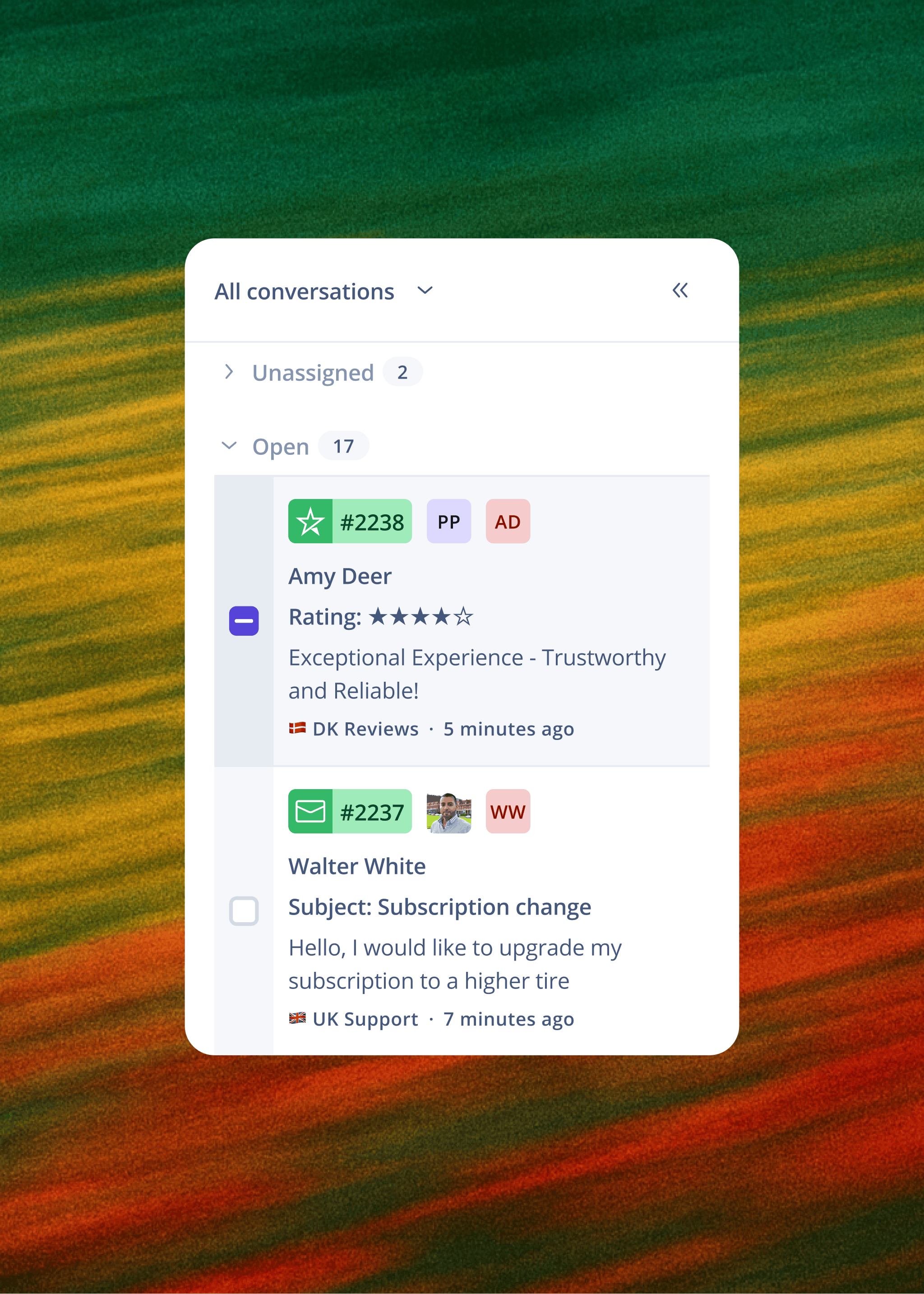
A help desk warns agents when another team member is viewing or replying to a conversation to avoid duplicate replies, a failure mode that defines shared inbox operations. Automatic routing eliminates cherry picking by pushing emails directly to agents, removing the manual assignment step and the need to constantly check inboxes for new arrivals. Neglect runs the other way: one agent assumes a colleague is handling an email, the colleague assumes the same, and the thread sits at the bottom of the inbox.
Duplicate replies and how ticketing stops them
An email ticketing system routes emails intelligently, links them to customer history, and tracks SLAs so agents don't accidentally reply to the same email. The routing assigns each conversation to one agent, so there is no queue to browse and no second agent picking up the same thread.
The conversation history problem
When a customer emails on Monday and calls on Wednesday, the agent answering the call should not need to ask "can you remind me what this is about?" That moment is what unified conversation history eliminates. Shared inboxes fragment history across email threads, with no link to previous interactions or order context.
Reporting that arrives a day late
A manager who sees queue length and SLA status in real time can shift agent availability during a spike before customers start waiting. With 24-hour delayed reporting, those decisions happen the next morning, after the damage is done.
Smart routing: How the queue organises itself
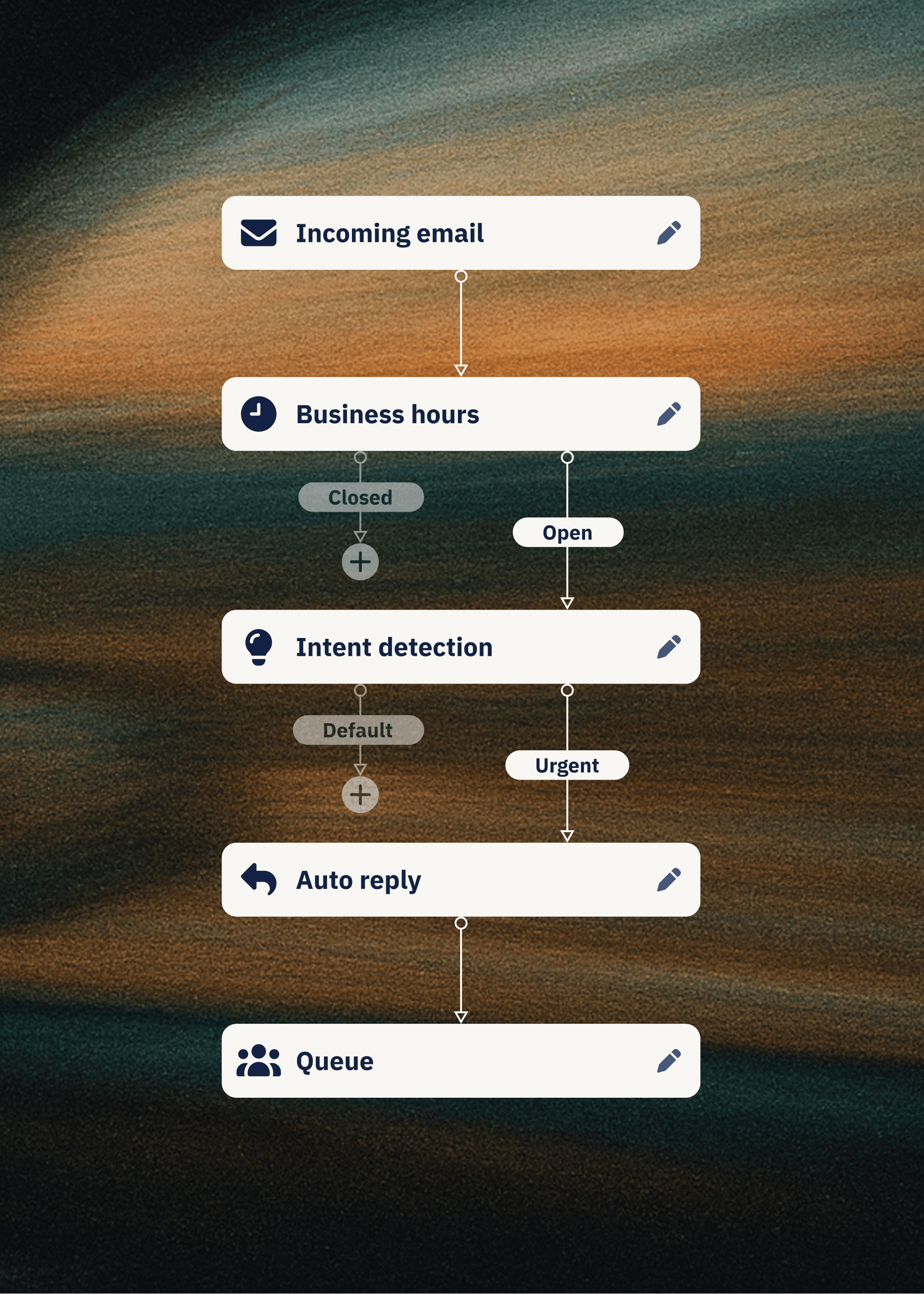
Smart routing turns a shared inbox into a structured queue by applying assignment rules, ownership logic, and SLA tracking to every inbound email. This section covers how Dixa's Flow Builder lets CS managers change rules without IT tickets, how ownership prevents queue drift, and how automated alerts protect SLAs.
Automating ticket routing and distribution
Dixa's Flow Builder is a visual tool that lets you build automation logic (routing rules, escalation paths, auto-replies, tagging, follow-up scheduling) by dragging and dropping rather than writing code. Intent-based routing is configured in the same builder by CS managers without IT involvement. When your workflows need to change, a team lead changes them that day, without an IT ticket or a developer.
Assigning ownership to prevent queue drift
Queue drift happens when older conversations sink to the bottom of a shared queue because nobody is accountable for them. Workload balancing spreads conversations across agents so none of them drowns while others sit idle, and VIP customers or urgent issues move up the queue on their routing rules.
Setting up automated SLA breach alerts
Dixa tracks SLA compliance in real time and can auto-escalate conversations approaching breach. Each email type, customer segment, or team can carry its own SLA target, so the queue's definition of on time matches the conversation it holds.
Linking historical data to active tickets
Most rollouts go live in two to four weeks with historical conversation data imported, so agents retain context from day one. A customer who emailed six months ago has that history visible when they contact you again, eliminating the "start from zero" problem.
Measuring agent productivity
Core metrics include first response time (FRT), average handle time (AHT), and customer satisfaction (CSAT). Real-time dashboards on Dixa's entry plan show response times, handle times, resolution rates, and SLA performance live.
How to turn a shared inbox into a ticketing system
The migration from shared inbox to email ticketing system is a process change you can run alongside the existing queue. These six steps take you from unstructured email to a structured queue with assignment, ownership, SLAs, and reporting.
1. Document your shared inbox bottlenecks
Read two to four weeks of mailbox traffic before you change anything. Identify which email types consume the most time, which agents handle which queries, and where handoffs break down. Keep the taxonomy short: a few categories and two or three priority levels, so agents can apply them without a manual.
2. Automate ticket routing and ownership
Keep the same email address. Dixa connects to your existing email infrastructure, so you keep your addresses and domain and customers see replies from your normal addresses. Set up an auto-reply that confirms receipt when a customer contacts you. Map your current workflow to routing rules and status workflows before you switch anything on.
3. Define SLAs by ticket priority
Create initial canned responses for common queries, then define response and resolution targets by priority level. High-priority issues (payment failures, delivery complaints) get tighter SLAs than general product questions.
4. Monitor queue health and agent KPIs
Run a soft launch with test conversations, go live with monitoring, and track queue depth, agent workload, and SLA status so you can rebalance assignments before breaches occur.
5. Assign clear ownership for every conversation
Every conversation gets a named owner from the moment it arrives. Ownership doesn't mean that agent resolves it alone. It means they are accountable for ensuring it gets resolved, whether by them, a specialist, or an escalation.
6. Mitigate migration risk via parallel run
Pick a cut-off date, import your historical conversation data, and train agents before the cut-off. Both systems run in parallel for two weeks: your team works in the new queue, with each customer's past emails visible alongside new ones, while the old inbox stays live as a safety net. Most rollouts go live in two to four weeks with guided onboarding, and the cautious plan adds two weeks of parallel testing.
We use Dixa daily for our everyday customer support and it has made life so much easier for both our team, and our end users. The Dixa platform is super user friendly and intuitive to use. Every team member that we have introduced to it has found it incredibly easy to navigate and there is minimal training required. The onboarding/implementation process was a breeze. We felt really supported by a knowledgeable, friendly and responsive team and integrating the platform into our processes was so easy. Aside from this, the Dixa product team are consistently developing new features that are genuinely ALL super helpful, and clearly in relation to some feedback from a platform user. We LOVE Dixa! - Sofie G. on G2
Choosing how tickets get assigned
Ticket assignment is the mechanism that turns a shared inbox into a structured queue. This section covers the two main routing strategies (round-robin and skills-based), how to adjust routing rules as SLAs shift, and how to prevent backlog during seasonal peaks.
Round-robin vs skills-based routing
Round-robin routing distributes conversations to agents in a preset sequence, moving to the next-listed agent after each assignment. It suits uniform queries where every agent is equipped to handle every request. Skills-based routing matches conversations to agents by skill, language, priority, and workload, and it suits teams where customers contact them for varied reasons. Dixa routes by skill, language, priority, workload, and VIP status using rules built in the Flow Builder, so a VIP customer writing in German about a damaged order reaches a German-speaking senior agent instead of whoever is next in rotation.
Adjusting routing rules as SLAs shift
When you spot an SLA breach forming, you change the routing rule the same afternoon in the flow builder, with no IT ticket. Because SLA targets can differ by email type, customer segment, or team, you can tighten the rule for the affected queue without changing how the rest of the team is routed.

Preventing backlog during busy seasons
Skills-based routing spreads conversations across the team by skill, language, and workload, so peak volume doesn't pool in one specialist's queue. Mim handles the routine share before it reaches an agent, which helped tink cut Black Friday seasonal hires from 80–90 to 10.
Protecting response times when volume surges
Response time suffers first when a shared inbox fills up. An email ticketing system protects FRT by enforcing SLAs, triaging by priority, and alerting you before breaches occur.
Setting realistic first response targets
Charles Tyrwhitt cut email first response time from 3 hours 45 minutes to roughly 50 minutes after switching to Dixa. On a 130-agent team, that kind of reduction is a headcount argument the CFO can read at a glance.
Triage workflows for seasonal volume
During peak, not every email deserves the same response time. Triage workflows route payment failures and delivery complaints to the front of the queue while routing general product questions to a lower-priority tier. This protects CSAT on the conversations that matter most.
Dixa has delivered us unrivaled support when it comes to building a completely new flow for our different markets. The system introduced us to a new way of building flows in a much more intuitive way, that has paved the way for us to create new functions and features for our channels. With great onboarding and a support team to back that up, we never found ourselves out of the loop or left out to dry. There has always been great and efficient help just around the corner. - Marcus H. on G2
Proactive alerts for SLA breaches
Real-time dashboards show current queue depth, active conversations, agent availability, and wait times. Automated alerts notify team leads when a conversation approaches its SLA limit, so they can reassign it or escalate before the breach occurs.
Reporting that answers the CFO
Reporting is what turns CS from a cost centre into a business case the CFO can read. Real-time dashboards on queue depth, agent productivity, and contact reasons give you the data to argue for resources, justify headcount, and prove that service quality drives retention.
How to analyse queue capacity trends
Capacity analysis compares the work coming in with the work your team can absorb. Track inbound volume by channel week over week, split it into what AI handles and what reaches a human, and set the human share against agent availability and queue depth. When the human share grows faster than headcount, the capacity gap shows up months before peak rather than on Black Friday.
tink shows how those numbers move once AI takes the routine share. With Mim handling 59% of emails and 70% of live chats without human involvement, email response time fell from 4–5 days to roughly 50 minutes. Over the same period, the business kept growing while its permanent support team went from 16–20 full-time agents to two full-time agents and four working students.
Agent productivity by channel
A phone call, a live chat, and an email are not equal units of work, so a blended productivity average hides where agent time goes. Break handle time, conversations per hour, and resolution rate out by channel. A channel with inflated handle time usually points to agents gathering context from other tools before they can answer.
Royal Design saw calls answered rise by 87% and agents save two hours per day once every channel ran through one queue on Dixa. Dixa’s Team Hub puts order history, conversation history, and live channel access on one screen, so less of each conversation goes to looking things up.
Identifying top contact drivers for CFOs
Contact-reason categorisation captures the product complaints and friction points that recur hundreds of times a month in your queue, but on a shared inbox none of it reaches marketing, product, or commercial leadership. Ranking contact reasons by volume shows the CFO which fixes outside CS, such as clearer delivery estimates, would cut contacts at the source.
Dixa’s Advanced Insights categorises every conversation by contact reason automatically, and it’s included on Enterprise or available as a €29 per agent per month add-on.
Maintaining CSAT during peak surges
During peak, CSAT tends to drop after the queue does, so track the two together. Watch CSAT by channel daily through the peak period, alongside queue depth and first response time, and a backlog building on one channel shows up before the scores fall. SLA alerts give team leads time to move agents onto that channel while the dip is still small.
Oliver Bonas, a British lifestyle retailer, held CSAT at 90% through peak season while hiring up to 30 fewer seasonal agents, because Mim absorbed the tier 1 volume and the permanent team handled the rest.
See how brands in your vertical are handling peak season volume. Book a 30-minute demo to see what migration from your current shared inbox would look like.
FAQs
Can I keep using my current email address?
Yes. Dixa connects to your existing email infrastructure, so you keep your email addresses and domain, and customers see replies from your normal addresses. Set up an auto-reply so customers know their email was received.
How long does migration from a shared inbox take?
Most migrations go live in two to four weeks with guided onboarding. Adding two weeks of parallel testing, with the old inbox kept live as a backup, brings the total to four to six weeks.
What happens to historical email conversations?
They move with you. Historical conversation data is imported during migration, so agents see a customer’s past emails alongside new ones.
Do I need IT resources to set up routing rules?
No. Dixa's Flow Builder is configured by CX managers and team leads without IT involvement. Routing rules, auto-replies, escalation paths, and SLA triggers are all built without code.
How does email ticketing handle peak volume?
Email ticketing handles peak volume by routing every email to an owner by skill and workload, moving urgent issues to the front of the queue, and alerting team leads before SLAs breach. An AI agent like Dixa’s Mim resolves routine queries such as order status before they reach an agent.
Key terms glossary
Collision detection: A feature that warns agents when another team member is viewing or replying to a conversation, preventing duplicate responses and inconsistent answers.
First response time (FRT): The elapsed time between a customer's initial contact and the first agent response, typically measured in minutes or hours.
First contact resolution (FCR): The percentage of conversations resolved in a single interaction without requiring follow-up contacts or escalations.
Queue depth: The number of unassigned or in-progress conversations waiting for agent attention at a given moment, a key indicator of backlog risk.
Round-robin routing: An assignment method that distributes conversations to agents in a preset sequence, moving to the next-listed agent after each assignment.
Skills-based routing: An assignment method that routes conversations based on agent skills, specialties, and abilities rather than simple rotation.
SLA (service level agreement): A defined target for response time or resolution time, typically expressed as a percentage of conversations handled within a specified timeframe.
Author

Stay in the know
Get CX insights, proven strategies, & the latest news in your inbox every month!